
The safest iPad mini 8 case choice is a cover explicitly made for iPad mini (A20 Pro), paired with a separate Bluetooth keyboard if you need one. Apple’s Australian store lists a dedicated A20 Pro Smart Folio and Belkin Infinity Folio, plus standalone keyboards. This gives you a usable typing setup without gambling on an older shell’s fit.
The new mini is narrower and thinner than the A17 Pro model. A listing that says only “iPad mini 6/7” is not enough. Before buying, match the named model, check the stand and Pencil access, then add up what the whole setup will cost.
Check which iPad mini you are buying for
Retailers often call the 2026 model “iPad mini 8”, while Apple calls it iPad mini (A20 Pro). Use both names when searching, but let the manufacturer’s compatibility section settle the purchase. In Settings → General → About, check the model name and model number rather than guessing from the colour or screen alone.
Apple’s current dimensions explain why an old case is risky. The A20 Pro model measures 195.3 × 132.6 × 5.4mm. The A17 Pro mini measures 195.4 × 134.8 × 6.3mm. The new model is 2.2mm narrower and 0.9mm thinner, even though the height is nearly unchanged.
| Fit check | iPad mini A17 Pro | iPad mini A20 Pro |
|---|---|---|
| Height | 195.4mm | 195.3mm |
| Width | 134.8mm | 132.6mm |
| Thickness | 6.3mm | 5.4mm |
| Display diagonal | 8.3 inches | 8.5 inches |
| What to order | A case whose maker lists A17 Pro | A case whose maker lists A20 Pro |
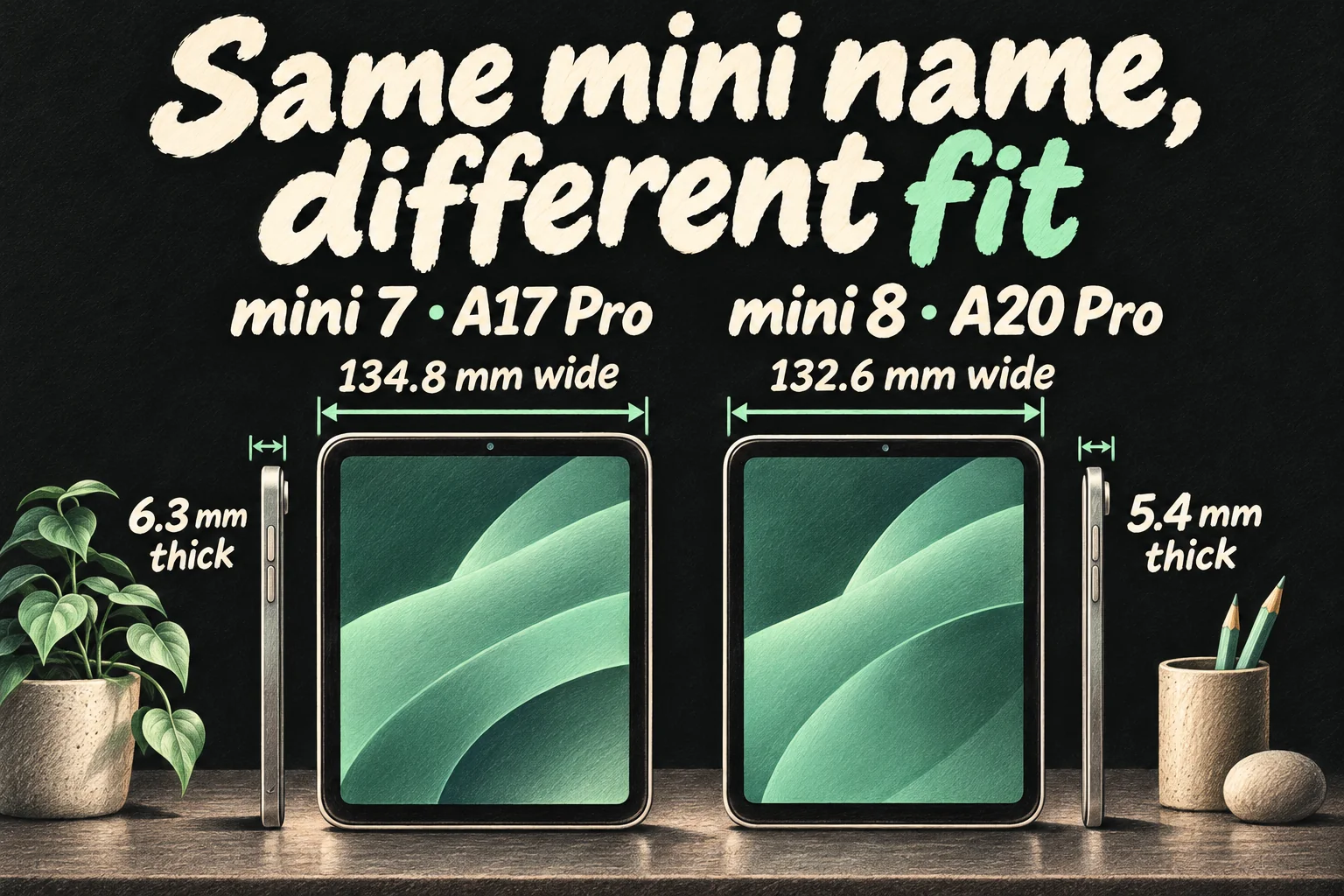
Dimensions do not prove every old folio fails, and matching the screen diagonal does not prove compatibility either. A rigid shell, magnetic cover and soft sleeve have different tolerances. Ask the maker about the exact version rather than forcing a tablet into a case that presses on buttons or leaves it loose.


Confirmed case options in Apple’s Australian store
These are named options whose individual product pages specify iPad mini (A20 Pro), checked 19 November 2026. Prices include GST. This is a compatibility shortlist, not a hands-on durability ranking or a survey of every case sold in Australia.
| Case | Checked Australian price | Choose it for |
|---|---|---|
| Apple Smart Folio for iPad mini A20 Pro | A$129 at Apple | A thin magnetic front-and-back cover that folds into a stand. |
| Belkin Infinity Folio for iPad mini A20 Pro | A$119.95 at Apple | A protective shell with a removable cover, adjustable kickstand and Pencil storage. |
The Smart Folio makes sense when compactness and easy folding matter most. It is a cover, not a keyboard, and front-and-back coverage should not be mistaken for a protective shell around every edge. Check how you hold the mini when reading with the cover folded back.
The Belkin Infinity Folio is worth comparing if you want a shell, a more adjustable stand or Pencil storage. Apple lists its weight as 297g. Added to the 255g Wi-Fi mini, that is approximately 552g before adding a keyboard, using the published component weights rather than a weighed assembled unit.
That trade-off matters more on a small tablet than on a laptop. A heavier case may be useful protection, but it changes one-handed reading. Choose the construction for how you carry the device rather than assuming the more substantial option is always better.
Which keyboard works without a fitted keyboard case?
A standalone Bluetooth keyboard avoids the shell-fit problem. Apple’s A20 Pro accessory range includes Logitech Keys-To-Go 2 for iPad and the desktop-style Magic Keyboard (USB-C). The Magic Keyboard name here means a separate keyboard, not the hinged Magic Keyboard case made for selected iPad Air or Pro models.
| Keyboard | Checked price at Apple Australia | What it adds |
|---|---|---|
| Logitech Keys-To-Go 2 for iPad | A$139.95 | A portable Bluetooth keyboard with a protective keyboard cover; iPad stand sold separately. |
| Magic Keyboard USB-C, US English | A$149 | A separate rechargeable Bluetooth keyboard; it does not hold or cover the iPad. |
Logitech’s own Australian store also showed a universal Keys-To-Go 2 variant at A$129.95. Check the layout, colour and exact edition before calling that the same offer as Apple’s iPad version. A similar product name does not guarantee the same keyboard layout or bundle.
For email, travel notes and occasional documents, a separate keyboard lets you leave it behind on reading-only days. For long sessions, test the screen height and the depth of your stand-plus-keyboard setup. A compact tablet with a full-width keyboard can need more desk space than its screen size suggests.

Check Pencil access, stand stability and the full cost
Apple lists Apple Pencil Pro and Apple Pencil USB-C support for the A20 Pro mini. If you use a magnetic Pencil, check that the case leaves the attachment area accessible and that any storage flap closes with your actual Pencil in place. A loop that stores a stylus is not proof that it charges through the case.
For typing, a stand should hold the screen at a comfortable angle while you tap the display. For handwritten notes, check the lower drawing angle. Test both portrait reading and landscape typing if you use both; some covers make one orientation easier than the other.
| Example accessory bundle | Calculation | Accessory total |
|---|---|---|
| Smart Folio + Keys-To-Go 2 for iPad | A$129 + A$139.95 | A$268.95 |
| Belkin Infinity Folio + Keys-To-Go 2 for iPad | A$119.95 + A$139.95 | A$259.90 |
| Keep an existing compatible Bluetooth keyboard | New case price + A$0 for the keyboard | A$119.95 or A$129 in these examples |

The Belkin-and-Logitech bundle also adds a listed 297g case and 222g keyboard to a 255g Wi-Fi mini: about 774g in component weights. That is not an assembled measurement, but it is a useful packing estimate. If the keyboard stays on your desk, you do not need to carry that total every day.

Pair the keyboard and check it before your return window closes
- Match the case’s compatibility page to iPad mini (A20 Pro) and select the correct variant before paying.
- Fit the case gently. Check Touch ID, volume buttons, camera openings, speaker/microphone areas and the USB-C cable opening.
- Put the keyboard into its manufacturer’s pairing mode, then select it in the iPad’s Bluetooth settings. Keep it charged or check its batteries.
- Type a paragraph in the app you plan to use. Test your preferred layout, punctuation, shortcuts and switching back to touch input.
- Check stand stability and Pencil access, then keep the packaging until you know the setup suits your desk and bag.
My starting recommendation is a light folio for a reading-first mini, plus an existing Bluetooth keyboard if you already own one. Add the portable keyboard when it solves a regular typing task. Choose a fitted keyboard case only when its manufacturer explicitly lists the A20 Pro model and its return terms let you check the fit.
Sources and compatibility basis
Checked 19 November 2026: Apple Australia iPad mini technical specifications; Apple Support “iPad mini (A17 Pro) — Tech Specs”; individual Australian product pages for the A20 Pro Smart Folio, Belkin Infinity Folio, Logitech Keys-To-Go 2 for iPad and Magic Keyboard USB-C; Logitech’s Australian Keys-To-Go 2 page. Prices and weights are listed values, not hands-on measurements. Confirm the selected variant and checkout price before ordering.